Usage Guide
This guide provides a comprehensive overview of using the dtFFT library to perform parallel data transpositions and optionally
Fast Fourier Transforms (FFTs) across host and GPU environments.
Designed for high-performance computing, dtFFT simplifies the process of decomposing multidimensional data, managing memory,
and executing transformations by integrating with external FFT libraries or operating in Transpose-Only mode.
Whether targeting CPU clusters with MPI or GPU-accelerated systems with CUDA, this library offers flexible configuration options to
optimize performance for specific use cases. The following sections detail key aspects of working with dtFFT, from plan creation to
execution and resource management, with practical examples in Fortran, C, and C++.
Error Handling and Macros
Almost all dtFFT functions return error codes to indicate whether execution was successful. These codes help users identify and handle issues during plan creation, memory allocation, execution, and finalization. The error handling mechanism differs slightly across language APIs:
Fortran API: Functions include an optional
error_codeparameter (typeinteger(int32)), always positioned as the last argument. It is always recommended to check the returned error code after each call.C API: Functions return a value of type
dtfft_error_t, allowing direct inspection of the result.C++ API: Most functions return
dtfft::Error. Some overloads throwdtfft::Exceptionon error instead.
To simplify error checking, dtFFT provides predefined macros that wrap function calls and handle error codes automatically:
Fortran: The
DTFFT_CHECKmacro, defined indtfft.f03, checks theerror_codeand halts execution with an informative message if an error occurs. Include this header with#include "dtfft.f03"to use it. Note: using this macro requires preprocessing.C: The
DTFFT_CALLmacro wraps function calls, checks the returneddtfft_error_t, and triggers an appropriate response (printing an error message and exiting) if the call fails.C++: The
DTFFT_CXX_CALLmacro similarly wraps calls, throws a C++ exception, and displays an error message.Python: The Python API raises an exception on error, so standard try-except blocks can be used for error handling.
Below is an example demonstrating error handling with these macros:
#include "dtfft.f03"

...

call plan%execute(a, b, DTFFT_EXECUTE_FORWARD, error_code=error_code)
DTFFT_CHECK(error_code)  ! Halts if error_code != DTFFT_SUCCESS

...
#include <dtfft.h>

...

DTFFT_CALL( dtfft_execute(plan, a, b, DTFFT_EXECUTE_FORWARD, NULL) )

...
#include <dtfft.hpp>

...

DTFFT_CXX_CALL( plan.execute(a, b, dtfft::Execute::FORWARD, nullptr) );
import dtfft

try:
    plan.execute(a, b, dtfft.Execute.FORWARD)
except dtfft.dtfft_Exception as e:
    print(f"Error occurred: {e}")
Plan Creation
dtFFT supports three plan categories, each tailored to specific transformation requirements:
Real-to-Real (R2R)
Complex-to-Complex (C2C)
Real-to-Complex (R2C)
dtFFT provides two complementary workflows for constructing a plan:
Global-dimension workflow – supply the global lattice extents and allow
dtFFTto derive the process decomposition. This workflow is detailed in Global-Dimension Workflow.Local-decomposition workflow – supply the portion of the domain owned by each MPI rank via a pencil descriptor. This workflow is described in Local-Decomposition Workflow.
Both workflows share the same configuration surface (plan category, precision, executor, and effort level); they differ only in how the data distribution is communicated to the library.
Global-Dimension Workflow
This default workflow constructs a plan by providing the global array dimensions (in Fortran order) together with the MPI communicator. dtFFT deduces the process decomposition from that information, optionally complemented by the optimization effort and FFT executor parameters.
Plans are instantiated through the create method or the corresponding language-specific constructor, as described in the Fortran, C, and C++ API sections. Every plan accepts an MPI communicator that defines the process distribution.
When the global-dimension workflow is used, dtFFT must derive how the global domain is partitioned across MPI ranks. The subsections below outline the default strategy and how to supply a custom topology. Users employing the local-decomposition workflow already provide this information explicitly through the pencil descriptor and can skim this section.
Default Behavior
When the communicator passed during plan creation is MPI_COMM_WORLD with \(P\) processes, dtFFT attempts the following steps in order:
If \(P <= N_z\) (and \(N_z / P >= 32\) for the GPU version), split the grid as \(N_x \times N_y \times N_z / P\). This distributes the Z-dimension across \(P\) processes. Division need not be even, and the local size per process may vary.
If the Z-split fails (e.g., \(P > N_z\) or \(N_z / P < 32\) on GPU), attempt \(N_x \times N_y / P \times N_z\). This distributes the Y-dimension across
Pprocesses, provided \(P \le N_x\) to remain compatible with future transpositions (e.g., Y-to-X, which results in \(N_y \times N_z \times N_x / P\)).If both attempts fail,
dtFFTconstructs a 3D communicator by fixing the X-dimension split to 1 and usingMPI_Dims_create(P, 2, dims)to balance the remaining \(P\) processes across \(Y\) and \(Z\), resulting in \(N_x \times N_y / P_1 \times N_z / P_2\) (where \(P_1 \times P_2 = P\)).If this 3D decomposition is not viable (e.g., \(N_y < P_1\) or \(N_z < P_2\)),
dtFFTproceeds but prints a warning message. Ensure DTFFT_ENABLE_LOG is enabled to observe it.
User-Controlled Decomposition
Applications may supply a communicator with an attached Cartesian topology. Grid dimensions must be provided in Fortran order (X, Y, Z).
1D Communicator: A one-dimensional communicator with \(P\) processes splits the grid as \(N_x \times N_y \times N_z / P\), distributing the Z-dimension across \(P\) processes.
2D Communicator: A two-dimensional communicator with topology \(P_1 \times P_2\) (where \(P_1 * P_2 = P\)) decomposes the grid as \(N_x \times N_y / P_1 \times N_z / P_2\), splitting \(Y\) by \(P_1\) and \(Z\) by \(P_2\) while keeping \(X\) indivisible.
3D Communicator: A three-dimensional communicator with topology \(P_0 \times P_1 \times P_2\) (where \(P_0 * P_1 * P_2 = P\)) is supported, but \(P_0\) (the X split) must be 1 to preserve the fastest-varying dimension. Violating this constraint triggers
DTFFT_ERROR_INVALID_COMM_FAST_DIM.
The example below illustrates the global-dimension workflow by creating a 3D C2C double-precision Transpose-Only plan:
#include "dtfft.f03"
! dtfft.f03 contains macro DTFFT_CHECK
use iso_fortran_env
use dtfft
use mpi ! or use mpi_f08

type(dtfft_plan_c2c_t) :: plan
integer(int32) :: dims(3)
integer(int32) :: error_code
type(dtfft_effort_t) :: effort = DTFFT_PATIENT
type(dtfft_precision_t) :: precision = DTFFT_DOUBLE
type(dtfft_executor_t) :: executor = DTFFT_EXECUTOR_NONE

call MPI_Init()

! Set dimensions
dims = [32, 32, 32]

! Creating plan with create method
call plan%create(dims, MPI_COMM_WORLD, precision, effort, executor, error_code)
DTFFT_CHECK(error_code)
#include <dtfft.h>
#include <mpi.h>

int main(int argc, char *argv[]) {
  dtfft_plan_t plan;
  int32_t dims[3] = {32, 32, 32};

  MPI_Init(&argc, &argv);

  // Creating plan
  DTFFT_CALL( dtfft_create_plan_c2c(3, dims, MPI_COMM_WORLD, DTFFT_DOUBLE, DTFFT_PATIENT, DTFFT_EXECUTOR_NONE, &plan) );

  return 0;
}
#include <dtfft.hpp>
#include <mpi.h>
#include <vector>

int main(int argc, char *argv[]) {
  MPI_Init(&argc, &argv);

  const std::vector<int32_t> dims = {32, 32, 32};
  dtfft::Precision precision = dtfft::Precision::DOUBLE;
  dtfft::Effort effort = dtfft::Effort::PATIENT;
  dtfft::Executor executor = dtfft::Executor::NONE;

  // Creating plan with constructor
  dtfft::PlanC2C plan(dims, MPI_COMM_WORLD, precision, effort, executor);

  // OR use generic interface
  // dtfft::PlanC2C plan(dims.size(), dims.data(), MPI_COMM_WORLD, precision, effort, executor);

  return 0;
}
import dtfft
from mpi4py import MPI

# Set dimensions
dims = [32, 32, 32]

# Create plan
plan = dtfft.PlanC2C(dims, MPI.COMM_WORLD, dtfft.Precision.DOUBLE, dtfft.Effort.PATIENT, dtfft.Executor.NONE)
Local-Decomposition Workflow
The alternative workflow constructs a plan from a user-defined pencil decomposition. Instead of supplying global dimensions, the application provides, for each MPI rank, the starting indices and extents of the local sub-domain. This workflow affords full control over data locality and aligns dtFFT with pre-existing domain decompositions.
Use this approach when you need to:
Reuse a decomposition generated by another solver or library.
Guarantee specific locality constraints (for example, to co-locate data with accelerators or I/O tasks).
Persist a previously tuned decomposition and avoid re-running autotuning logic.
Utilize brick data decomposition, where data is distributed across all dimensions (2 dimensions for 2D plans, 3 dimensions for 3D plans), unlike pencil decomposition which distributes across 2 dimensions (keeping one dimension local).
Both constructors and create methods accept the dtfft_pencil_t descriptor. The descriptor stores the dimensionality, the local starting indices (0-based), and the counts along each dimension.
The example below decomposes a \(64 \times 64 \times 64\) grid by splitting only along the slowest (Z) dimension. Each rank describes its local block and then creates a plan using the pencil descriptor.
#include "dtfft.f03"
use iso_fortran_env
use dtfft
use mpi

type(dtfft_plan_c2c_t) :: plan
type(dtfft_pencil_t) :: my_pencil
integer(int32) :: error_code
integer(int32) :: starts(3), counts(3)
integer :: rank, size, ierr

call MPI_Init(ierr)
call MPI_Comm_rank(MPI_COMM_WORLD, rank, ierr)
call MPI_Comm_size(MPI_COMM_WORLD, size, ierr)

starts = [0, 0, rank * (64 / size)]
counts = [64, 64, 64 / size]

my_pencil = dtfft_pencil_t(starts, counts)

call plan%create(my_pencil, MPI_COMM_WORLD, DTFFT_DOUBLE, DTFFT_ESTIMATE, DTFFT_EXECUTOR_NONE, error_code)
DTFFT_CHECK(error_code)
#include <dtfft.h>
#include <mpi.h>

int main(int argc, char *argv[]) {
  dtfft_plan_t plan;
  dtfft_pencil_t pencil;
  int rank, size;

  MPI_Init(&argc, &argv);
  MPI_Comm_rank(MPI_COMM_WORLD, &rank);
  MPI_Comm_size(MPI_COMM_WORLD, &size);

  pencil.ndims = 3;
  pencil.starts[0] = 0;
  pencil.starts[1] = 0;
  pencil.starts[2] = rank * (64 / size);
  pencil.counts[0] = 64;
  pencil.counts[1] = 64;
  pencil.counts[2] = 64 / size;

  DTFFT_CALL( dtfft_create_plan_c2c_pencil(&pencil, MPI_COMM_WORLD,
                DTFFT_DOUBLE, DTFFT_ESTIMATE, DTFFT_EXECUTOR_NONE, &plan) );

  return 0;
}
#include <dtfft.hpp>

int main(int argc, char *argv[]) {
  MPI_Init(&argc, &argv);

  int rank, size;
  MPI_Comm_rank(MPI_COMM_WORLD, &rank);
  MPI_Comm_size(MPI_COMM_WORLD, &size);

  std::vector<int32_t> starts = {0, 0, rank * (64 / size)};
  std::vector<int32_t> counts = {64, 64, 64 / size};

  auto pencil = dtfft::Pencil(starts, counts);

  dtfft::PlanC2C plan(pencil, MPI_COMM_WORLD, dtfft::Precision::DOUBLE,
                      dtfft::Effort::ESTIMATE, dtfft::Executor::NONE);

  return 0;
}
import dtfft
from mpi4py import MPI

comm = MPI.COMM_WORLD
rank = comm.Get_rank()
size = comm.Get_size()

starts = [0, 0, rank * (64 // size)]
counts = [64, 64, 64 // size]

pencil = dtfft.Pencil(starts, counts)

plan = dtfft.PlanC2C(pencil, comm, dtfft.Precision.DOUBLE, dtfft.Effort.ESTIMATE, dtfft.Executor.NONE)
Bricks decomposition
For 2D and 3D plans, a common special case of the local-decomposition workflow is a brick layout where data is distributed across all dimensions. This layout can be more efficient for certain applications and is natively supported by dtFFT. The library automatically detects when a brick decomposition is used and applies optimized reshape strategies to realign data for FFT execution.
3D case. Assume the global domain is \(N_x \times N_y \times N_z\) and ranks are arranged as \(P_0 \times P_1 \times P_2\).
Let the local brick on each rank be
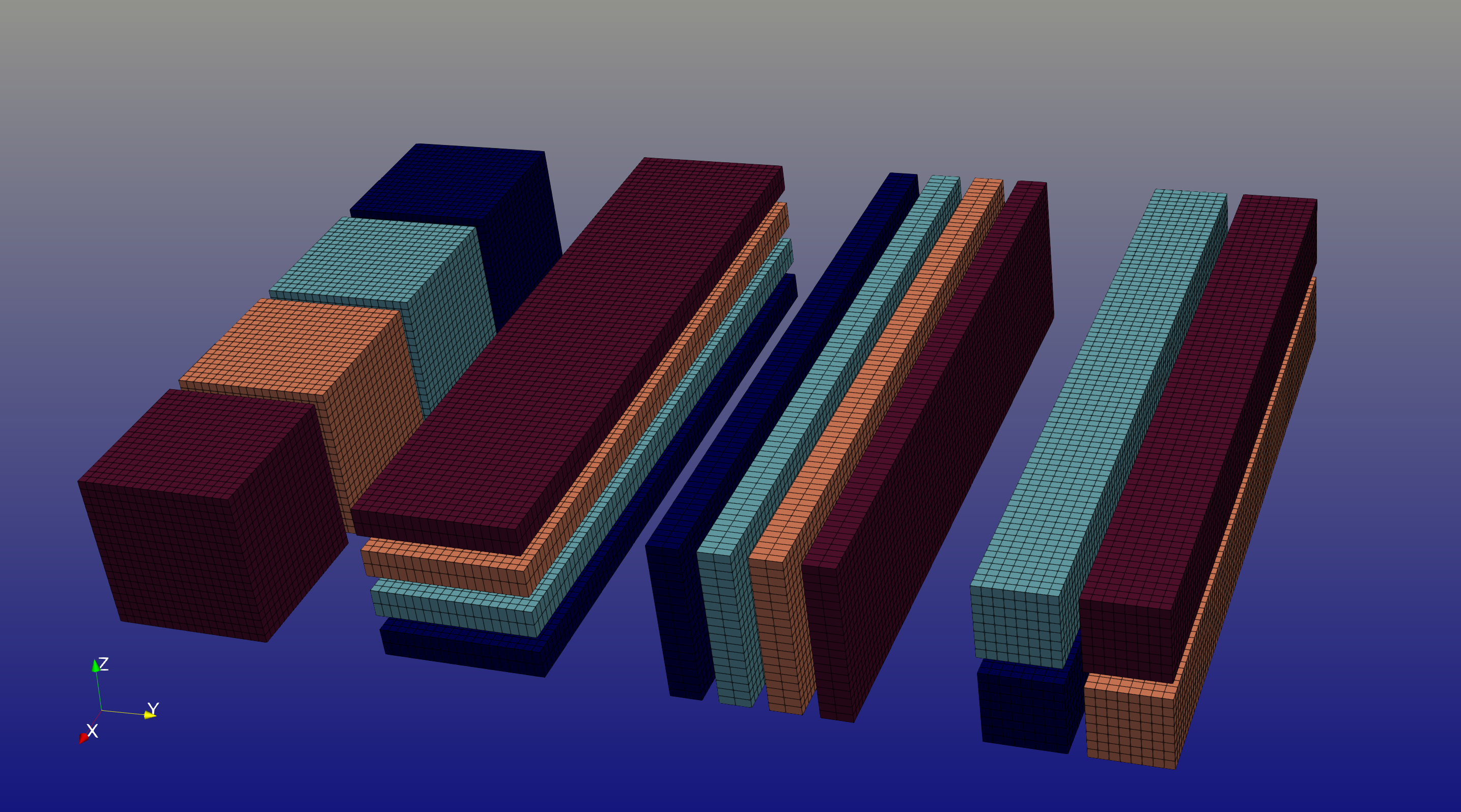
To execute FFTs along the fastest-varying dimension (X), the data must be realigned into X-pencils. This requires gathering data from all \(P_0\) bricks along the X dimension to reconstruct the full \(N_x\) extent, while the \(P_0\) processes are redistributed across the \(Y\) and/or \(Z\) dimensions. Inside dtFFT this operation is called reshape. dtFFT attempts the following reshape strategies in order:
\(N_x \times n_y \times (n_z / P_0)\) — gather full X dimension, redistribute \(P_0\) processes along Z (keeping Y local)
\(N_x \times (n_y / P_0) \times n_z\) — gather full X dimension, redistribute \(P_0\) processes along Y (keeping Z local)
If neither strategy is feasible (i.e. \(n_y < P_0\) or \(n_z < P_0\)), dtFFT falls back to a 2D redistribution of the \(P_0\) ranks by choosing \(Q_1 \times Q_2\) such that \(Q_1 Q_2 = P_0\), and uses:
The figure below illustrates the three reshape strategies for bricks in 3D. The leftmost layout shows the initial brick decomposition with \(P_0 = 4\) ranks along the \(X\) dimension. The next three layouts show the resulting pencil decompositions after applying each reshape strategy: splitting along \(Z\) (strategy 1), splitting along \(Y\) (strategy 2), and the 2D split with \(Q_1 = Q_2 = 2\) (strategy 3). Each colored block represents data from one rank, and the figure shows a single slice corresponding to one of the \(P_1 \times P_2\) positions. The reshape strategy is selected on rank 0 based on divisibility constraints and performance considerations, then broadcasted to all other ranks.
2D case. Assume the global domain is \(N_x \times N_y\) and ranks are arranged as \(P_0 \times P_1\). Let the local block be \((N_x / P_0) \times n_y\), where \(n_y = N_y / P_1\). In this case, dtFFT attempts to redistribute across the \(P_0\) ranks (keeping \(n_y\) fixed) as:
\(N_x \times (n_y / P_0)\)
Note
By default, execute() does not reshape data from pencils to bricks in Fourier space. To enable, set enable_fourier_reshape field of dtfft_config_t to true.
User-controlled redistribution
As in the global-dimension workflow, users can influence how the redistribution is performed by passing an MPI communicator with an attached Cartesian topology during plan creation.
1D communicator: redistributes the \(P_0\) processes by splitting the last dimension.
2D communicator:
For 3D data, redistributes across the \(Y\) and \(Z\) directions.
For 2D data, the split along the first (X) dimension must be 1 (to preserve the fastest-varying dimension).
3D communicator: supported for 3D data only; the split along the \(X\) dimension must be 1.
For 3D data, additional consistency constraints apply. Let the Cartesian communicator have \(R_1\) and \(R_2\) processes in the \(Y\) and \(Z\) directions. Then:
\(R_1 \ge P_1\) and \(R_2 \ge P_2\)
Define \(r_1 = R_1 / P_1\) and \(r_2 = R_2 / P_2\) (integers). The redistribution must satisfy \(r_1 r_2 = P_0\).
Slab Optimizations
dtFFT supports two slab optimizations that can reduce the number of data transpositions during plan execution by employing two-dimensional FFT algorithms where applicable. These optimizations are controlled via the dtfft_config_t structure or corresponding environment variables.
Z-Slab Optimization
When the grid is decomposed as \(N_x \times N_y \times N_z / P\), the Z-slab optimization becomes available. If enabled (default), it reduces the number of data transpositions by employing a two-dimensional FFT algorithm along the X and Y dimensions during calls to execute(). This also enables DTFFT_TRANSPOSE_X_TO_Z and DTFFT_TRANSPOSE_Z_TO_X in transpose(), while other transpose types remain available.
This optimization can be disabled through the enable_z_slab field in dtfft_config_t or the DTFFT_ENABLE_Z_SLAB environment variable. It cannot be forced when the decomposition is incompatible with Z-slab requirements. Consider disabling it to resolve DTFFT_ERROR_VKFFT_R2R_2D_PLAN errors or when the underlying 2D FFT implementation is too slow. In all other cases, Z-slab is considered faster.
Y-Slab Optimization
When the grid is decomposed as \(N_x \times N_y / P \times N_z\), the Y-slab optimization can be enabled. If enabled (disabled by default), dtFFT will skip the transpose step between Y-aligned and Z-aligned layouts during calls to execute(), employing a two-dimensional FFT algorithm along the Y and Z dimensions instead.
This optimization can be enabled through the enable_y_slab field in dtfft_config_t. Consider disabling it when the underlying 2D FFT implementation is too slow.
Precision and FFT Executor
Two parameters govern the numerical representation and FFT backend selection:
Precision (
dtfft_precision_t):DTFFT_SINGLE– single precisionDTFFT_DOUBLE– double precision
FFT Executor (
dtfft_executor_t):DTFFT_EXECUTOR_NONE–Transpose-Only(no FFT)DTFFT_EXECUTOR_FFTW3– FFTW3 (host only, available when compiled with FFTW3 support)DTFFT_EXECUTOR_MKL– MKL DFTI (host only, available when compiled with MKL support)DTFFT_EXECUTOR_CUFFT– cuFFT (GPU only, available when compiled with CUDA support)DTFFT_EXECUTOR_VKFFT– VkFFT (GPU only, available when compiled with VkFFT support)
Setting Additional Configurations
The dtfft_config_t type allows users to set additional configuration parameters for dtFFT before plan creation, tailoring its behavior to specific needs, such as backend selection and performance tuning. These settings are optional and can be applied using the constructor dtfft_config_t() or the dtfft_create_config() function, followed by a call to dtfft_set_config().
Configurations must be set prior to creating a plan to take effect. The available parameters are summarized below:
Field |
Type / Enum |
Default |
CUDA |
Description |
|---|---|---|---|---|
|
logical |
|
Enable autotuning / selection logging (errors are always printed regardless). |
|
|
logical |
|
Enable Z-slab optimization (fewer transfers, enables X↔Z transpose path). Disable to work around 2D FFT issues (e.g. |
|
|
logical |
|
Enable Y-slab optimization (fewer transfers). Disable to work around 2D FFT issues. |
|
|
integer |
|
Number of warmup iterations during autotune when effort > |
|
|
integer |
|
Number of measured iterations during autotune when effort > |
|
|
|
✓ |
Execution platform (HOST / CUDA). Available only when built with CUDA. When |
|
|
(internal) |
✓ |
Custom CUDA stream override (user destroys it after plan). Otherwise internally managed. |
|
|
differs between HOST / CUDA |
Backend used for |
||
|
differs between HOST / CUDA |
Backend used for reshape operations when |
||
|
logical |
|
Allow MPI datatype backend during autotuning on host. |
|
|
logical |
|
Allow MPI backends (P2P, A2A, etc.) to be tested during backend autotune. |
|
|
logical |
|
Allow pipelined backends to be tested during backend autotune. |
|
|
logical |
|
Allow RMA backends to be tested during backend autotune. |
|
|
logical |
|
Allow fused backends to be tested during backend autotune. |
|
|
logical |
|
✓ |
Allow NCCL-based backends to be tested during backend autotune. |
|
logical |
|
✓ |
Allow NVSHMEM-enabled backends to be tested during backend autotune. |
|
logical |
|
Enable kernel autotuning for effort levels below |
|
|
logical |
|
Execute reshapes from pencils to bricks in Fourier space during calls to |
|
|
|
Specifies at which stage the local transposition is performed during global exchange when effort level is below |
||
|
|
Specifies the memory access pattern (write/read) for local transpositions in Generic backends. This option only applies for HOST execution platform. |
||
|
logical |
|
Enable compressed backends during autotuning (only fixed-rate compression allowed). |
|
|
Compression configuration for transpose operations. |
|||
|
Compression configuration for reshape operations. |
Note
Fields marked “CUDA” are available only if the library was compiled with CUDA (DTFFT_WITH_CUDA).
Note
Almost all values can be overridden at runtime by setting the appropriate environment variable, which takes precedence if set. Refer to Environment Variables section.
The following example creates a config object, disables Z-slab, enables MPI backends, and sets a custom stream:
use cudafor
use dtfft

integer(cuda_stream_kind) :: my_stream
type(dtfft_config_t) :: config
integer :: ierr

! Create config with default values
config = dtfft_config_t()

! Disable Z-slab optimization
config%enable_z_slab = .false.

! Enable MPI backends for autotuning
config%enable_mpi_backends = .true.

! Create and set custom CUDA stream
ierr = cudaStreamCreate(my_stream)
config%stream = dtfft_stream_t(my_stream)

! Apply configuration
call dtfft_set_config(config)

! Now we can create a plan
#include <cuda_runtime.h>
#include <dtfft.h>

cudaStream_t my_stream;
dtfft_config_t config;

// Create config with default values
dtfft_create_config(&config);

// Disable Z-slab optimization
config.enable_z_slab = 0;

// Enable MPI backends for autotuning
config.enable_mpi_backends = 1;

// Create and set custom CUDA stream
cudaStreamCreate(&my_stream);
config.stream = (dtfft_stream_t)my_stream;

// Apply configuration
dtfft_set_config(&config);

// Now we can create a plan
#include <cuda_runtime.h>
#include <dtfft.hpp>

cudaStream_t my_stream;
dtfft::Config config;  // Automatically fills with default values

// Disable Z-slab optimization
config.set_enable_z_slab(false);

// Enable MPI backends for autotuning
config.set_enable_mpi_backends(true);

// Create and set custom CUDA stream
cudaStreamCreate(&my_stream);
config.set_stream((dtfft_stream_t)my_stream);

// Apply configuration
dtfft::set_config(config);

// Now we can create a plan
import dtfft
import cupy as cp

# Can create config using type constructor
config = dtfft.Config(
    enable_z_slab=False,
    enable_mpi_backends=True,
    stream=cp.cuda.Stream()
)

# or create config with default values
# and set fields individually
config = dtfft.Config()

# Disable Z-slab optimization
config.enable_z_slab = False

# Enable MPI backends for autotuning
config.enable_mpi_backends = True

# Create and set custom CUDA stream
my_stream = cp.cuda.Stream()
config.stream = my_stream

# Python API is slightly different
# One should pass config when creating the plan instead of setting it globally
plan = dtfft.PlanC2C(..., config=config)
Selecting plan effort
The effort parameter in dtFFT determines the level of optimization applied during plan creation, influencing how data transposition is configured. The choice of effort impacts both plan creation time and runtime performance. Higher effort levels increase setup time but can enhance transposition efficiency, especially for large datasets or complex grids. The supported effort levels defined by dtfft_effort_t control the extent of this optimization as follows:
DTFFT_ESTIMATE
This minimal-effort option prioritizes fast plan creation.
On the host, dtFFT selects a default grid decomposition. All configurations, such as communication backend and transpose mode are extracted from dtfft_config_t structure or corresponding environment variables without any autotuning.
DTFFT_MEASURE
With this moderate-effort setting, dtFFT explores multiple grid decomposition strategies to reduce communication overhead during transposition, cycling through possible grid layouts to find an efficient configuration. Just like DTFFT_ESTIMATE, other configurations are taken from dtfft_config_t structure or corresponding environment variables without autotuning.
If a Cartesian communicator is provided or plan is being created using dtfft_pencil_t structure, it reverts to DTFFT_ESTIMATE behavior, relying on the user-specified topology.
DTFFT_PATIENT
This effort option extends DTFFT_MEASURE by selecting the best-performing communication backend for transpose operations. At this level backend for reshape operations is not autotuned and taken from dtfft_config_t structure or corresponding environment variable.
DTFFT_EXHAUSTIVE
This maximum-effort option extends DTFFT_PATIENT by including kernel autotuning, that executes local transposes and packing/unpacking operations, and selecting the best-performing backend for reshape operations. This level also enables autotuning of dtfft_transpose_mode_t by executing each generic backend twice. It is not recommended to use this effort level with Global-dimension workflow on a huge number of processes.
Note
Kernel autotuning can be enabled with all efforts below DTFFT_EXHAUSTIVE by setting the enable_kernel_autotune field of dtfft_config_t to true or using the DTFFT_ENABLE_KERNEL_AUTOTUNE environment variable.
Selecting backend
The communication backend is responsible for data exchange during transpositions and reshapes. dtFFT supports multiple backends, each with distinct performance characteristics and requirements. The backend selection can be influenced by the backend and reshape_backend fields in dtfft_config_t or corresponding environment variables. Following backends are available for both host and CUDA platforms:
MPI_P2P (
DTFFT_BACKEND_MPI_P2P) – Point-to-point MPI communication usingMPI_IsendandMPI_Irecv.MPI_A2A (
DTFFT_BACKEND_MPI_A2A) – Collective MPI communication usingMPI_Alltoall[v]. Note that this backend does not support padding in order to make all exchange size to be equal.MPI_Alltoallvis used when sizes are unequal.MPI_DATATYPE (
DTFFT_BACKEND_MPI_DATATYPE) - Collective MPI communication using derived datatypes to represent non-contiguous data layouts, combined withMPI_Alltoall[w].
Note
This backend is not recommended to use on CUDA platform.
Note
This backend is not used during autotuning on CUDA platform.
MPI_P2P_PIPELINED (
DTFFT_BACKEND_MPI_P2P_PIPELINED) – A pipelined version of the MPI_P2P backend. This backend performs packing all data at once before communication is started. After that MPI_P2P communication is launched and unpacking is performed in chunks while communication is ongoing.MPI_P2P_SCHEDULED (
DTFFT_BACKEND_MPI_P2P_SCHEDULED) – A scheduled version of the MPI_P2P backend. This backend uses round-robin scheduling and utilizingMPI_Sendrecv.MPI_RMA (
DTFFT_BACKEND_MPI_RMA) – Same as MPI_P2P , however one-sided communication is used viaMPI_Rget. Can only be used whendtFFTis built with MPI RMA support.MPI_RMA_PIPELINED (
DTFFT_BACKEND_MPI_RMA_PIPELINED) – Same as MPI_P2P_PIPELINED, however one-sided communication is used.MPI_P2P_FUSED (
DTFFT_BACKEND_MPI_P2P_FUSED) – An extension of MPI_P2P_PIPELINED and MPI_P2P_SCHEDULED backends that adds packing to the pipeline while utilizing scheduling for communication.MPI_P2P_COMPRESSED (
DTFFT_BACKEND_MPI_P2P_COMPRESSED) – An extension of MPI_P2P_FUSED backend that adds data compression before communication and decompression after communication. Can only be used whendtFFTis built with compression support.MPI_RMA_FUSED (
DTFFT_BACKEND_MPI_RMA_FUSED) – Same as MPI_P2P_FUSED, however one-sided communication is used.MPI_RMA_COMPRESSED (
DTFFT_BACKEND_MPI_RMA_COMPRESSED) – Same as MPI_P2P_COMPRESSED, however one-sided communication is used.
Following backends are available only when dtFFT is built with CUDA support and CUDA platform is selected:
NCCL (
DTFFT_BACKEND_NCCL) - NVIDIA Collective Communications Library (NCCL) backend for GPU-to-GPU communication.NCCL_PIPELINED (
DTFFT_BACKEND_NCCL_PIPELINED) – A pipelined version of the NCCL backend. This backend does not launch communication with self data, instead it performs only packing and unpacking for that part.NCCL_COMPRESSED (
DTFFT_BACKEND_NCCL_COMPRESSED) – An extension of NCCL_PIPELINED backend that adds data compression before communication and decompression after communication. Can only be used whendtFFTis built with compression support.CUFFTMP (
DTFFT_BACKEND_CUFFTMP) - Backend that uses cuFFTMp library standalone reshape functionality for GPU-to-GPU communication. This backend requires explicit memory copy viacudaMemcpyAsyncin order to move data to result buffer after communication.CUFFTMP_PIPELINED (
DTFFT_BACKEND_CUFFTMP_PIPELINED) – Same as CUFFTMP, however it requires additional buffer to remove explicit memory copy after communication.
All backends listed above can be selected via dtfft_config_t (fields backend and reshape_backend) and will be used for all transpose and reshape operations when effort < DTFFT_PATIENT.
The DTFFT_BACKEND_ADAPTIVE backend can be selected when effort >= DTFFT_PATIENT. In this mode, dtFFT selects the fastest backend independently for each transpose/reshape operation (the selection is performed during plan creation and remains fixed for the lifetime of the plan).
Note
Currently, DTFFT_BACKEND_ADAPTIVE is only available for the HOST execution platform.
Compression
dtFFT supports data compression during transposition for certain backends to reduce communication overhead. Currently, compression is implemented using the ZFP library, supporting all its compression modes except expert-mode. Note that although ZFP does not natively support compression of complex numbers, dtFFT handles this by compressing the real and imaginary parts separately in two passes. When setting compression parameters, consider the data type of the complex numbers (float or double).
When compression is enabled, dtFFT expects the compressed data size to always be smaller than the original. If this condition is not met (it can happen even if fixed-rate mode is used), an error occurs and the program aborts.
Backends supporting compression can be used during autotuning, but only fixed-rate compression is allowed to ensure predictable and stable performance measurements during the tuning process.
The compression configuration is specified using the dtfft_compression_config_t structure, which includes the following fields:
compression_lib: The compression library to use (currently only
DTFFT_COMPRESSION_LIB_ZFPis supported).compression_mode: The compression mode (
DTFFT_COMPRESSION_MODE_LOSSLESS,DTFFT_COMPRESSION_MODE_FIXED_RATE,DTFFT_COMPRESSION_MODE_FIXED_PRECISION, orDTFFT_COMPRESSION_MODE_FIXED_ACCURACY).rate: Compression rate for fixed-rate mode (bits per value, higher values for less compression).
precision: Number of bits of precision for fixed-precision mode.
tolerance: Tolerance for fixed-accuracy mode.
When compression is not intended to be used, but library is built with compression support, do not change the default values of dtfft_compression_config_t structure, since it may trigger an error during checking the validity of the compression configuration.
Memory Allocation
After a plan is created, users may need to determine the memory required to execute it.
The plan method get_local_sizes() retrieves the number of elements in “real” and “Fourier” spaces and the minimum number of elements that must be allocated:
in_starts: Start indices of the local data portion in real-space (0-based)
in_counts: Number of elements in the local data portion in real-space
out_starts: Start indices of the local data portion in Fourier-space (0-based)
out_counts: Number of elements in the local data portion in Fourier-space
alloc_size: Minimum number of elements needed for
inandoutbuffers
Note
If Y-slab optimization is enabled (see get_y_slab_enabled()), the Fourier-space layout is Y-aligned instead of Z-aligned, and out_* values reflect the Y-aligned layout.
Arrays in_starts, in_counts, out_starts, and out_counts must have at least as many elements as the plan’s dimensions.
The minimum number of bytes required for each buffer is alloc_size * element_size. The element_size can be obtained by get_element_size() which returns:
C2C:
2 * sizeof(double) = 16 bytes(double precision) or2 * sizeof(float) = 8 bytes(single precision)R2R and R2C:
sizeof(double) = 8 bytes(double precision) orsizeof(float) = 4 bytes(single precision)
integer(int64) :: alloc_size, element_size

! Get number of elements
call plan%get_local_sizes(alloc_size=alloc_size)

! OR use convenient wrapper
! alloc_size = plan%get_alloc_size()

! Optionally get element size in bytes
element_size = plan%get_element_size()
size_t alloc_size;

// Get number of elements
dtfft_get_local_sizes(plan, NULL, NULL, NULL, NULL, &alloc_size);

// OR use convenient wrapper
// dtfft_get_alloc_size(plan, &alloc_size);

// Optionally get element size in bytes
size_t element_size;
dtfft_get_element_size(plan, &element_size);
size_t alloc_size;

// Get number of elements
DTFFT_CXX_CALL( plan.get_local_sizes(nullptr, nullptr, nullptr, nullptr, &alloc_size) );

// OR use wrapper
DTFFT_CXX_CALL( plan.get_alloc_size(&alloc_size) );

// OR use even more convenient wrapper
auto alloc_size = plan.get_alloc_size();

// Optionally get element size in bytes
size_t element_size;
DTFFT_CXX_CALL( plan.get_element_size(&element_size) );

// OR use convenient wrapper
auto element_size = plan.get_element_size();
# This block of code is not required in Python, since more pythonic method
# get_ndarray (see below) returns an array with the correct size and dtype
Note that get_local_sizes() does not describe intermediate pencil layouts. For both 2D and 3D plans, detailed layout information can be retrieved via the pencil interface (see Retrieving memory layouts (Pencils) below).
The dtFFT library provides functions to allocate and free memory tailored to the plan:
mem_alloc(): Allocates memory.mem_free(): Frees memory allocated bymem_alloc().
Fortran interface provides additional methods for memory allocation and deallocation:
mem_alloc_ptr(): Allocates memory and returns a pointer of typec_ptr.mem_free_ptr(): Frees memory allocated bymem_alloc_ptr().
Host Version
Allocates memory based on the dtfft_executor_t:
fftw_mallocfor FFTW3mkl_mallocfor MKL DFTaligned_alloc(16-byte alignment) from the C11 standard library for transpose-only plans.
GPU Version
Allocates memory based on the dtfft_backend_t:
ncclMemAllocfor NCCL (if available)nvshmem_mallocfor NVSHMEM-based backendscudaMallocotherwise.
If NCCL is used and supports buffer registration via ncclCommRegister, and the environment variable DTFFT_NCCL_BUFFER_REGISTER is not set to 0, the allocated buffer will also be registered. This registration optimizes communication performance by reducing the overhead of memory operations, which is particularly beneficial for workloads with repeated communication patterns.
use iso_fortran_env

! Host version
complex(real64), pointer :: a(:), b(:), aux(:)
! CUDA Fortran version
complex(real64), device, contiguous, pointer :: a(:), b(:), aux(:)

! Allocates memory
call plan%mem_alloc(alloc_size, a, error_code=error_code); DTFFT_CHECK(error_code)
call plan%mem_alloc(alloc_size, b, error_code=error_code); DTFFT_CHECK(error_code)
call plan%mem_alloc(alloc_size, aux, error_code=error_code); DTFFT_CHECK(error_code)

! or use pointers of type c_ptr
use iso_c_binding

type(c_ptr) :: a_ptr, b_ptr, aux_ptr
integer(int64) :: alloc_bytes

alloc_bytes = alloc_size * element_size
a_ptr = plan%mem_alloc_ptr(alloc_bytes, error_code=error_code); DTFFT_CHECK(error_code)
b_ptr = plan%mem_alloc_ptr(alloc_bytes, error_code=error_code); DTFFT_CHECK(error_code)
aux_ptr = plan%mem_alloc_ptr(alloc_bytes, error_code=error_code); DTFFT_CHECK(error_code)
size_t alloc_bytes = alloc_size * element_size;
double *a, *b, *aux;

DTFFT_CALL( dtfft_mem_alloc(plan, alloc_bytes, (void**)&a) );
DTFFT_CALL( dtfft_mem_alloc(plan, alloc_bytes, (void**)&b) );
DTFFT_CALL( dtfft_mem_alloc(plan, alloc_bytes, (void**)&aux) );
#include <complex>

size_t alloc_bytes = alloc_size * element_size;
std::complex<double> *a;

// C-like way of memory allocation
DTFFT_CXX_CALL( plan.mem_alloc(alloc_bytes, reinterpret_cast<void**>(&a)) );

// C++ way, note that this way may throw dtfft::Exception on error
// Note that number of elements is passed here instead of bytes
// Size of each element is defined by template argument
auto b = plan.mem_alloc<std::complex<double>>(alloc_size);
auto aux = plan.mem_alloc<std::complex<double>>(alloc_size);
import dtfft
import cupy as cp

# Create a plan (example parameters)
plan = dtfft.PlanC2C(...)

# Get allocation size via plan property
alloc_size = plan.alloc_size

# Allocate memory
a = plan.get_ndarray(alloc_size)
# One may optionally specify shape, dtype and memory order ('C' or 'F')
# Returned array is either NumPy or CuPy array depending on the execution platform of the plan

b = plan.get_ndarray(alloc_size, shape=(...), dtype=np.complex128, order='F')
Note
Memory allocated with mem_alloc() must be deallocated with mem_free() before the plan is destroyed to avoid memory leaks.
Retrieving memory layouts (Pencils)
For detailed layout information in 2D and 3D plans, use the get_pencil() method. The requested layout is selected via dtfft_layout_t (Fortran/C) or dtfft::Layout (C++).
Supported layouts are:
DTFFT_LAYOUT_X_BRICKS: X-brick layout (available only for plans that support reshape, i.e., bricks-decomposition plans).DTFFT_LAYOUT_Z_BRICKS: Z-brick layout (available only for plans that support reshape, i.e., bricks-decomposition plans).DTFFT_LAYOUT_X_PENCILS: X-pencil layout in real-space.DTFFT_LAYOUT_X_PENCILS_FOURIER: X-pencil layout in Fourier-space for R2C plans.DTFFT_LAYOUT_Y_PENCILS: Y-pencil layout.DTFFT_LAYOUT_Z_PENCILS: Z-pencil layout (3D plans only).
DTFFT_LAYOUT_X_PENCILS_FOURIER is meaningful only for R2C plans: it describes the distribution and local extents of the Fourier-space X-pencil representation (which differs from real-space X-pencils due to reduced extent along the transformed dimension). For non-R2C plans, requesting this layout returns DTFFT_ERROR_INVALID_LAYOUT.
This call returns a dtfft_pencil_t structure containing:
dim: Aligned dimension ID (1 for X, 2 for Y, 3 for Z).
ndims: Number of dimensions in the pencil (2 or 3)
starts: Local start indices (0-based) in natural Fortran order. In C/C++, the array
starts[3]always has size 3, but only the firstndimselements contain valid data.counts: Local element counts (in elements) in natural Fortran order. In C/C++, the array
counts[3]always has size 3, but only the firstndimselements contain valid data.size: Total number of elements in a pencil
type(dtfft_pencil_t) :: x_pencil, y_pencil, z_pencil

x_pencil = plan%get_pencil(DTFFT_LAYOUT_X_PENCILS, error_code); DTFFT_CHECK(error_code)
y_pencil = plan%get_pencil(DTFFT_LAYOUT_Y_PENCILS, error_code); DTFFT_CHECK(error_code)
z_pencil = plan%get_pencil(DTFFT_LAYOUT_Z_PENCILS, error_code); DTFFT_CHECK(error_code)

! Access pencil properties, e.g., x_pencil%dim, x_pencil%starts
dtfft_pencil_t x_pencil, y_pencil, z_pencil;

DTFFT_CALL( dtfft_get_pencil(plan, DTFFT_LAYOUT_X_PENCILS, &x_pencil) );
DTFFT_CALL( dtfft_get_pencil(plan, DTFFT_LAYOUT_Y_PENCILS, &y_pencil) );
DTFFT_CALL( dtfft_get_pencil(plan, DTFFT_LAYOUT_Z_PENCILS, &z_pencil) );

// Access pencil properties, e.g., x_pencil.dim, x_pencil.starts
auto x_pencil = plan.get_pencil(dtfft::Layout::X_PENCILS); // throws dtfft::Exception on error
auto y_pencil = plan.get_pencil(dtfft::Layout::Y_PENCILS);
auto z_pencil = plan.get_pencil(dtfft::Layout::Z_PENCILS);

// Access pencil properties, e.g., x_pencil.get_dim(), x_pencil.get_starts()
x_pencil = plan.get_pencil(dtfft.Layout.X_PENCILS)
y_pencil = plan.get_pencil(dtfft.Layout.Y_PENCILS)
z_pencil = plan.get_pencil(dtfft.Layout.Z_PENCILS)

 # Access pencil properties, e.g., x_pencil.dim, x_pencil.starts
Plan Execution
There are three primary methods to execute a plan in dtFFT: execute, transpose, and reshape. The first performs the full workflow, while the others are useful for custom workflows that require only data transposition or reshaping (for example, when using an external FFT library).
Note
On a CUDA platform, all plan execution functions operate asynchronously. When a function returns, work is queued in a CUDA stream but may not be complete. Full synchronization with the host requires calling cudaDeviceSynchronize, cudaStreamSynchronize, or !$acc wait (for OpenACC). During execution, dtFFT may use multiple CUDA streams, but the final stage always occurs in the stream returned by get_stream(). Thus, synchronization may be unnecessary if users submit additional kernels to that stream.
Execute
This method executes a plan by optionally reshaping data from bricks to pencils (and vice versa), transposing data between pencils, and optionally performing FFTs based on the specified execute_type. It supports in-place execution; the same pointer can be safely passed to both in and out. To optimize memory usage, dtFFT uses the in buffer as intermediate storage, overwriting its contents. Users needing to preserve original data should copy it elsewhere.
Supported execute_type values are:
DTFFT_EXECUTE_FORWARD: Forward execution, transforming data from real-space to Fourier-space.DTFFT_EXECUTE_BACKWARD: Backward execution, transforming data from Fourier-space to real-space.
Note
For Transpose-Only plans with a Z-slab and identical in and out pointers, execution uses a
two-step transposition, as direct transposition is not possible with a single pointer.
Note
These are the only cases when in-place execution is not allowed:
2D
Transpose-Onlyplan3D
Transpose-Onlywith Y-slab optimization enabled.
Transpose-Onlyplan with bricks decomposition andenable_fourier_reshapeattribute indtfft_config_tset tofalse.
Note
Calling execute() on a Transpose-Only R2C plan is not allowed.
Example
Below is an example of executing a plan forward and backward:
! Assuming a 3D FFT plan is created and buffers `a`, `b`, and `aux` are allocated
call plan%execute(a, b, DTFFT_EXECUTE_FORWARD, aux, error_code)
DTFFT_CHECK(error_code)  ! Checks for execution errors

! Process Fourier-space data in buffer `b`
! ... (e.g., apply filtering)

! Backward execution
call plan%execute(b, a, DTFFT_EXECUTE_BACKWARD, aux, error_code)
DTFFT_CHECK(error_code)

! Alternatively, using pointers of type c_ptr. If aux is not needed, pass c_null_ptr
call plan%execute_ptr(a_ptr, b_ptr, DTFFT_EXECUTE_FORWARD, aux_ptr, error_code)
DTFFT_CHECK(error_code)

! ...

call plan%execute_ptr(b_ptr, a_ptr, DTFFT_EXECUTE_BACKWARD, c_null_ptr, error_code)
DTFFT_CHECK(error_code)
// Assuming a 3D FFT plan is created and buffers `a`, `b`, and `aux` are allocated
DTFFT_CALL( dtfft_execute(plan, a, b, DTFFT_EXECUTE_FORWARD, aux) )

// Process Fourier-space data in buffer `b`
// ... (e.g., apply filtering)

// Backward execution
DTFFT_CALL( dtfft_execute(plan, b, a, DTFFT_EXECUTE_BACKWARD, aux) )
// Assuming a 3D FFT plan is created and buffers `a`, `b`, and `aux` are allocated
DTFFT_CXX_CALL( plan.execute(a, b, dtfft::Execute::FORWARD, aux) )

// Process Fourier-space data in buffer `b`
// ... (e.g., apply filtering)

// Backward execution
DTFFT_CXX_CALL( plan.execute(b, a, dtfft::Execute::BACKWARD, aux) )

// C++ interface also provides convinient method for inplace execution
auto a_fourier = plan.forward(a, aux);
// `a_fourier` is a reference to the same memory as `a`, but now contains Fourier-space data.

auto a_back = plan.backward(a_fourier, aux);
// `a_back` is a reference to the same memory as `a_fourier` (and `a`), but now contains real-space data again.
# Assuming a 3D FFT plan is created and arrays `a`, `b`, and `aux` are created with appropriate sizes and dtypes
plan.execute(a, b, dtfft.Execute.FORWARD, aux)

# Process Fourier-space data in buffer `b`
# ... (e.g., apply filtering)

# Backward execution
plan.execute(b, a, dtfft.Execute.BACKWARD, aux)
Transpose
This method executes a single data transposition between different pencil layouts (e.g., X-aligned to Y-aligned), writing the result into the out buffer.
There are two ways to invoke it: synchronously by calling transpose() directly, or as a split-phase operation by calling transpose_start() followed by transpose_end() (managed via a dtfft_request_t handle).
The split-phase API is primarily useful for host plans with the following backends:
Regardless of platform, after transpose_start() returns, both in and out buffers must remain valid and unmodified until transpose_end() completes.
This method transposes data according to the specified transpose_type parameter. Supported options include:
DTFFT_TRANSPOSE_X_TO_Y: Transpose from X to YDTFFT_TRANSPOSE_Y_TO_X: Transpose from Y to XDTFFT_TRANSPOSE_Y_TO_Z: Transpose from Y to Z (valid only for 3D plans)DTFFT_TRANSPOSE_Z_TO_Y: Transpose from Z to Y (valid only for 3D plans)DTFFT_TRANSPOSE_X_TO_Z: Transpose from X to Z (valid only for 3D plans using Z-slab)DTFFT_TRANSPOSE_Z_TO_X: Transpose from Z to X (valid only for 3D plans using Z-slab)
Note
Passing the same pointer to both in and out is not permitted; doing so triggers the error DTFFT_ERROR_INPLACE_TRANSPOSE.
Datatype Backend Version: When the backend is DTFFT_BACKEND_MPI_DATATYPE, calling transpose() executes a single MPI_Ialltoall(w) call followed by MPI_Wait to complete the operation. In contrast, transpose_start() initiates the MPI_Ialltoall(w) call and returns a dtfft_request_t handle that must later be finalized with transpose_end(). In both cases, non-contiguous MPI datatypes are used; once the operation completes, the out buffer contains the transposed data and the in buffer remains unchanged.
Generic Version: Performs a three-step transposition: packing/exchange/unpacking. When only local transposition is needed (e.g., on a single process), it performs the operation directly without communication.
In other cases transposition depends on the selected dtfft_transpose_mode_t and dtfft_backend_t.
Consider the need to perform a transpose on \(P\) processes. When DTFFT_TRANSPOSE_MODE_PACK is selected, the steps are:
Executes a single, computationally intensive transposition kernel.
Performs data redistribution using the selected backend.
Executes \(P\) lightweight unpacking kernels. If the backend supports pipelining, these unpacking kernels may overlap with communication.
When DTFFT_TRANSPOSE_MODE_UNPACK is selected, the steps are:
Executes \(P\) lightweight packing kernels.
Performs data redistribution using the selected backend.
Executes \(P\) medium-weight transposition kernels.
Second approach may yield better performance of pipelined backends, as transposition is overlapped with communication.
In the Generic version, the in buffer may serve as intermediate storage and its contents may be modified. If you need to preserve in, copy it beforehand.
Example
Below is an example of transposing data from X to Y and back:
! Assuming plan is created and buffers `a` and `b` are allocated.
call plan%transpose(a, b, DTFFT_TRANSPOSE_X_TO_Y, error_code)
DTFFT_CHECK(error_code)  ! Checks for errors

! Process Y-aligned data in buffer `b`
! ... (e.g., apply scaling or analysis)

! Reverse transposition
call plan%transpose(b, a, DTFFT_TRANSPOSE_Y_TO_X, error_code)
DTFFT_CHECK(error_code)

! Alternatively, using pointers of type c_ptr
call plan%transpose_ptr(a_ptr, b_ptr, DTFFT_TRANSPOSE_X_TO_Y, error_code)
DTFFT_CHECK(error_code)

! ...

call plan%transpose_ptr(b_ptr, a_ptr, DTFFT_TRANSPOSE_Y_TO_X, error_code)
DTFFT_CHECK(error_code)
// Assuming plan is created and buffers `a` and `b` are allocated.
DTFFT_CALL( dtfft_transpose(plan, a, b, DTFFT_TRANSPOSE_X_TO_Y, NULL) )

// Process Y-aligned data in buffer `b`
// ... (e.g., apply scaling or analysis)

// Reverse transposition
DTFFT_CALL( dtfft_transpose(plan, b, a, DTFFT_TRANSPOSE_Y_TO_X, NULL) )
// Assuming plan is created and buffers `a` and `b` are allocated.
DTFFT_CXX_CALL( plan.transpose(a, b, dtfft::Transpose::X_TO_Y, nullptr) )

// Process Y-aligned data in buffer `b`
// ... (e.g., apply scaling or analysis)

// Reverse transposition
DTFFT_CXX_CALL( plan.transpose(b, a, dtfft::Transpose::Y_TO_X, nullptr) )
# Assuming plan is created and arrays `a` and `b` are created with appropriate sizes and dtypes
plan.transpose(a, b, dtfft.Transpose.X_TO_Y)

# Process Y-aligned data in buffer `b`
# ... (e.g., apply scaling or analysis)

# Reverse transposition
plan.transpose(b, a, dtfft.Transpose.Y_TO_X)
Reshape
This method redistributes data between brick and pencil decompositions, writing the result into the out buffer. It can be invoked either synchronously via reshape() or as a split-phase operation via reshape_start() followed by reshape_end() (managed via a dtfft_request_t handle).
Note
Reshape operations are available only for plans created with bricks decomposition. Calling reshape() on a plan without reshape support returns DTFFT_ERROR_RESHAPE_NOT_SUPPORTED.
Reshape operations may use a separate backend that is independent of the main transpose backend. The backend type is the same (i.e., dtfft_backend_t), and the set of supported backend values is the same as for transpose. The reshape backend can be configured via reshape_backend in dtfft_config_t or via the environment variable DTFFT_RESHAPE_BACKEND (see Environment Variables). To inspect the selected backends at runtime, use get_backend() (transpose) and get_reshape_backend() (reshape).
The split-phase API is primarily useful for host plans to overlap communication with computation. After reshape_start() returns, in, out and aux buffers must remain valid and must not be modified until reshape_end() completes.
This method reshapes data according to the specified reshape_type parameter. Supported options include:
DTFFT_RESHAPE_X_BRICKS_TO_PENCILS: Reshape from X-bricks to X-pencilsDTFFT_RESHAPE_X_PENCILS_TO_BRICKS: Reshape from X-pencils to X-bricksDTFFT_RESHAPE_Z_BRICKS_TO_PENCILS: Reshape from Z-bricks to Z-pencilsDTFFT_RESHAPE_Z_PENCILS_TO_BRICKS: Reshape from Z-pencils to Z-bricks
Inverse pairs are:
DTFFT_RESHAPE_X_BRICKS_TO_PENCILS<->DTFFT_RESHAPE_X_PENCILS_TO_BRICKSDTFFT_RESHAPE_Z_BRICKS_TO_PENCILS<->DTFFT_RESHAPE_Z_PENCILS_TO_BRICKS
For 2D plans, the same idea applies to Y layouts (DTFFT_RESHAPE_Y_BRICKS_TO_PENCILS <-> DTFFT_RESHAPE_Y_PENCILS_TO_BRICKS).
Note
Passing the same pointer to both in and out is not permitted; doing so triggers the error DTFFT_ERROR_INPLACE_RESHAPE.
Note
As with transpose() (Generic version), reshape may use the in buffer as temporary storage and its contents may be modified. If you need to preserve in, copy it beforehand.
Example
Below is an example of a full custom 3D FFT workflow using reshape() and transpose() together with an external (1D) FFT implementation. The FFT calls shown are placeholders: use FFTW/MKL/cuFFT/VkFFT (or another library) to execute 1D transforms along the currently aligned dimension.
! Assuming a bricks-decomposition plan is created and buffers `a`, `b` are allocated.
! 1) Bricks -> X-pencils
call plan%reshape(a, b, DTFFT_RESHAPE_X_BRICKS_TO_PENCILS, error_code)
DTFFT_CHECK(error_code)

! 2) 1D FFTs along X on X-pencil layout (external FFT)
! call fft_x_inplace(b)

! 3) X-pencils -> Y-pencils
call plan%transpose(b, a, DTFFT_TRANSPOSE_X_TO_Y, error_code)
DTFFT_CHECK(error_code)

! 4) 1D FFTs along Y on Y-pencil layout (external FFT)
! call fft_y_inplace(a)

! 5) Y-pencils -> Z-pencils
call plan%transpose(a, b, DTFFT_TRANSPOSE_Y_TO_Z, error_code)
DTFFT_CHECK(error_code)

! 6) 1D FFTs along Z on Z-pencil layout (external FFT)
! call fft_z_inplace(b)

! 7) Z-pencils -> bricks (e.g., to continue in brick layout)
call plan%reshape(b, a, DTFFT_RESHAPE_Z_PENCILS_TO_BRICKS, error_code)
DTFFT_CHECK(error_code)
// Assuming a bricks-decomposition plan is created and buffers `a`, `b` are allocated.
// 1) Bricks -> X-pencils
DTFFT_CALL( dtfft_reshape(plan, a, b, DTFFT_RESHAPE_X_BRICKS_TO_PENCILS, NULL) )

// 2) 1D FFTs along X on X-pencil layout (external FFT)
// fft_x_inplace(b);

// 3) X-pencils -> Y-pencils
DTFFT_CALL( dtfft_transpose(plan, b, a, DTFFT_TRANSPOSE_X_TO_Y, NULL) )

// 4) 1D FFTs along Y on Y-pencil layout (external FFT)
// fft_y_inplace(a);

// 5) Y-pencils -> Z-pencils
DTFFT_CALL( dtfft_transpose(plan, a, b, DTFFT_TRANSPOSE_Y_TO_Z, NULL) )

// 6) 1D FFTs along Z on Z-pencil layout (external FFT)
// fft_z_inplace(b);

// 7) Z-pencils -> bricks
DTFFT_CALL( dtfft_reshape(plan, b, a, DTFFT_RESHAPE_Z_PENCILS_TO_BRICKS, NULL) )
// Assuming a bricks-decomposition plan is created and buffers `a`, `b` are allocated.
// 1) Bricks -> X-pencils
DTFFT_CXX_CALL( plan.reshape(a, b, dtfft::Reshape::X_BRICKS_TO_PENCILS, nullptr) )

// 2) 1D FFTs along X on X-pencil layout (external FFT)
// fft_x_inplace(b);

// 3) X-pencils -> Y-pencils
DTFFT_CXX_CALL( plan.transpose(b, a, dtfft::Transpose::X_TO_Y, nullptr) )

// 4) 1D FFTs along Y on Y-pencil layout (external FFT)
// fft_y_inplace(a);

// 5) Y-pencils -> Z-pencils
DTFFT_CXX_CALL( plan.transpose(a, b, dtfft::Transpose::Y_TO_Z, nullptr) )

// 6) 1D FFTs along Z on Z-pencil layout (external FFT)
// fft_z_inplace(b);

// 7) Z-pencils -> bricks
DTFFT_CXX_CALL( plan.reshape(b, a, dtfft::Reshape::Z_PENCILS_TO_BRICKS, nullptr) )
# Assuming a bricks-decomposition plan is created and arrays `a`, `b` are created with appropriate sizes and dtypes.
# 1) Bricks -> X-pencils
plan.reshape(a, b, dtfft.Reshape.X_BRICKS_TO_PENCILS)

# 2) 1D FFTs along X on X-pencil layout (external FFT)
# fft_x_inplace(b)

# 3) X-pencils -> Y-pencils
plan.transpose(b, a, dtfft.Transpose.X_TO_Y)

# 4) 1D FFTs along Y on Y-pencil layout (external FFT)
# fft_y_inplace(a)

# 5) Y-pencils -> Z-pencils
plan.transpose(a, b, dtfft.Transpose.Y_TO_Z)

# 6) 1D FFTs along Z on Z-pencil layout (external FFT)
# fft_z_inplace(b)

# 7) Z-pencils -> bricks
plan.reshape(b, a, dtfft.Reshape.Z_PENCILS_TO_BRICKS)
Auxiliary Buffer Size
The auxiliary buffer aux is optional for all plan execution functions. If aux is not provided (NULL / not present), dtFFT allocates internal scratch space whenever the selected operation/backend requires it; otherwise, aux is ignored.
If you choose to provide aux yourself, the minimum size depends on the operation:
For
execute(): Useget_aux_size()(orget_aux_bytes()for byte size).For
transpose(): Useget_aux_size_transpose()(orget_aux_bytes_transpose()for byte size). If the returned size is zero,auxis not needed.For
reshape(): Useget_aux_size_reshape()(orget_aux_bytes_reshape()for byte size). If the returned size is zero,auxis not needed.
Plan properties
After creating a plan, several methods are available to inspect its runtime configuration and behavior. These methods, defined in dtfft_plan_t, provide valuable insights into the plan’s setup and are particularly useful for debugging or integrating with custom workflows. The following methods are supported:
get_z_slab_enabled(): Returns a logical value indicating whether Z-slab optimization is active in the plan.get_y_slab_enabled(): Returns a logical value indicating whether Y-slab optimization is active in the plan.get_backend(): Retrieves the backend selected during plan creation.get_reshape_backend(): Retrieves the backend used for reshape operations.get_stream(): Returns the CUDA stream associated with the plan. The stream is either internally created and managed bydtFFT, or a custom one provided by the user viadtfft_config_t(see Setting Additional Configurations).Available only in CUDA-enabled builds, it enables integration with existing CUDA workflows by exposing the stream used for GPU operations.
report(): Prints detailed plan information to stdout, including grid decomposition and backend selection. This diagnostic tool aids in understanding the plan’s configuration and troubleshooting unexpected behavior.report_compression(): Reports compression ratios for all operations where compression was performed. This function can be repeatedly called after plan creation and after execution to see how compression ratios evolve.get_executor(): Returns the executor type used for FFT computations within the plan.get_precision(): Returns the numerical precision (DTFFT_SINGLEorDTFFT_DOUBLE) of the plan.get_dims(): Returns global dimensions of the plan. This can be useful for validating the plan’s setup against expected sizes.get_grid_dims(): Returns the grid decomposition dimensions used in the plan, reflecting how the global domain is partitioned across MPI ranks.get_platform(): Returns the execution platform (DTFFT_PLATFORM_HOSTorDTFFT_PLATFORM_CUDA) of the plan.Available only in CUDA-enabled builds
These methods provide a window into the plan’s internal state, allowing users to validate settings or gather diagnostics post-creation. They remain accessible until the plan is destroyed with destroy(). For detailed usage, refer to the Fortran, C, and C++ API documentation.
Plan Finalization
To fully release all memory resources allocated by dtFFT for a plan, the plan must be explicitly destroyed. This ensures that all internal buffers and resources associated with the plan are freed.
Note
If buffers were allocated using mem_alloc(), they must be deallocated with mem_free() before destroying the plan. Failing to do so may result in memory leaks or undefined behavior.
Example
Below is an example of properly finalizing a plan and freeing allocated memory:
! Assuming a plan and buffers ``a``, ``b`` and ``aux`` are created and allocated with ``mem_alloc``
call plan%mem_free(a, error_code);   DTFFT_CHECK(error_code)
call plan%mem_free(b, error_code);   DTFFT_CHECK(error_code)
call plan%mem_free(aux, error_code); DTFFT_CHECK(error_code)

! Pointers allocated via mem_alloc_ptr must be freed with ``mem_free_ptr``
call plan%mem_free_ptr(a_ptr, error_code);   DTFFT_CHECK(error_code)
call plan%mem_free_ptr(b_ptr, error_code);   DTFFT_CHECK(error_code)
call plan%mem_free_ptr(aux_ptr, error_code); DTFFT_CHECK(error_code)

call plan%destroy(error_code)            ! Destroy the plan
DTFFT_CHECK(error_code)
// Assuming a plan and buffers ``a``, ``b`` and ``aux`` are created and allocated with `dtfft_mem_alloc`
DTFFT_CALL( dtfft_mem_free(plan, a) )   // Free buffer ``a``
DTFFT_CALL( dtfft_mem_free(plan, b) )   // Free buffer ``b``
DTFFT_CALL( dtfft_mem_free(plan, aux) ) // Free buffer ``aux``
DTFFT_CALL( dtfft_destroy(&plan) )      // Destroy the plan
// Assuming a plan and buffers ``a``, ``b`` and ``aux`` are created and allocated with `mem_alloc`
DTFFT_CXX_CALL( plan.mem_free(a) )    // Free buffer ``a``
DTFFT_CXX_CALL( plan.mem_free(b) )    // Free buffer ``b``
DTFFT_CXX_CALL( plan.mem_free(aux) )  // Free buffer ``aux``
DTFFT_CXX_CALL( plan.destroy() )      // Explicitly destroy the plan (optional if using destructor)
                                      // Automatic ~Plan() call when `plan` goes out of scope
# In Python, memory management is handled automatically avoiding leaks.
# Arrays derived from `plan.get_ndarray()` maintain a strong reference to the plan.
# The underlying C++ plan and memory allocations are safely destroyed
# only when the plan and all of its associated arrays are garbage-collected.

del a, b, aux  # Remove references to the allocated arrays
del plan       # The underlying plan and memory are appropriately freed here

# Alternatively, you can explicitly call destroy(). If any arrays are
# still actively holding memory, actual destruction is delayed until
# the last array reference is discarded.
# plan.destroy()
Complete Example
The following example demonstrates the full lifecycle of a dtFFT complex-to-complex plan:
creating a plan, allocating memory, executing forward and backward transformations, and properly finalizing resources.
program dtfft_sample
#include "dtfft.f03"
use iso_fortran_env
use dtfft
use mpi ! or use mpi_f08
use iso_c_binding
implicit none
  type(dtfft_plan_c2c_t) :: plan
  type(dtfft_config_t) :: config
  integer(int32) :: dims(3) = [64, 64, 64]  ! Example dimensions
  integer(int32) :: error_code
  integer(int64) :: alloc_size, element_size, alloc_bytes, aux_size
  complex(real64), pointer :: a(:), b(:), aux(:)

  call MPI_Init(error_code)

  ! Create dtfft_config_t object with default values
  config = dtfft_config_t()

  ! Disable Z-slab
  config%enable_z_slab = .false.

  ! Apply configuration to dtFFT
  call dtfft_set_config(config, error_code)
  DTFFT_CHECK(error_code)

  ! Create plan
  call plan%create(dims, MPI_COMM_WORLD, DTFFT_DOUBLE, DTFFT_PATIENT, DTFFT_EXECUTOR_NONE, error_code)
  DTFFT_CHECK(error_code)

  ! Obtain allocation sizes
  alloc_size = plan%get_alloc_size(error_code); DTFFT_CHECK(error_code)
  aux_size = plan%get_aux_size(error_code);     DTFFT_CHECK(error_code)

  ! Allocate memory
  call plan%mem_alloc(alloc_size, a, error_code); DTFFT_CHECK(error_code)
  call plan%mem_alloc(alloc_size, b, error_code); DTFFT_CHECK(error_code)
  call plan%mem_alloc(aux_size, aux, error_code); DTFFT_CHECK(error_code)

  ! Forward execution
  call plan%execute(a, b, DTFFT_EXECUTE_FORWARD, aux, error_code)
  DTFFT_CHECK(error_code)

  ! Process Fourier-space data in buffer `b` (e.g., apply filtering)
  ! ...

  ! Backward execution
  call plan%execute(b, a, DTFFT_EXECUTE_BACKWARD, aux, error_code)
  DTFFT_CHECK(error_code)

  ! Free memory
  call plan%mem_free(a, error_code); DTFFT_CHECK(error_code)
  call plan%mem_free(b, error_code); DTFFT_CHECK(error_code)
  call plan%mem_free(aux, error_code); DTFFT_CHECK(error_code)

  ! Destroy the plan
  call plan%destroy(error_code)
  DTFFT_CHECK(error_code)

  call MPI_Finalize(error_code)
end program dtfft_sample
#include <dtfft.h>
#include <mpi.h>

int main(int argc, char *argv[])
{
  dtfft_plan_t plan;
  dtfft_complex *a, *b, *aux;  // Use dtfft_complex from dtfft.h
  int32_t dims[3] = {64, 64, 64};  // Example dimensions
  size_t alloc_size, aux_size;

  MPI_Init(&argc, &argv);

  dtfft_config_t config;
  // Set default values to config
  dtfft_create_config(&config);
  // Disable Z-slab
  config.enable_z_slab = 0;

  // Apply configuration to dtFFT
  DTFFT_CALL( dtfft_set_config(&config) );

  // Create plan
  DTFFT_CALL( dtfft_create_plan_c2c(3, dims, MPI_COMM_WORLD, DTFFT_DOUBLE, DTFFT_PATIENT, DTFFT_EXECUTOR_NONE, &plan) );

  // Obtain allocation size
  DTFFT_CALL( dtfft_get_alloc_size(plan, &alloc_size) );
  DTFFT_CALL( dtfft_get_aux_size(plan, &aux_size) );

  // Allocate memory
  DTFFT_CALL( dtfft_mem_alloc(plan, sizeof(dtfft_complex) * alloc_size, (void**)&a) );
  DTFFT_CALL( dtfft_mem_alloc(plan, sizeof(dtfft_complex) * alloc_size, (void**)&b) );
  DTFFT_CALL( dtfft_mem_alloc(plan, sizeof(dtfft_complex) * aux_size, (void**)&aux) );

  // Forward execution
  DTFFT_CALL( dtfft_execute(plan, a, b, DTFFT_EXECUTE_FORWARD, aux) );

  // Process Fourier-space data in buffer `b` (e.g., apply filtering)
  // ...

  // Backward execution
  DTFFT_CALL( dtfft_execute(plan, b, a, DTFFT_EXECUTE_BACKWARD, aux) );

  // Free memory
  DTFFT_CALL( dtfft_mem_free(plan, a) );
  DTFFT_CALL( dtfft_mem_free(plan, b) );
  DTFFT_CALL( dtfft_mem_free(plan, aux) );

  // Destroy the plan
  DTFFT_CALL( dtfft_destroy(&plan) );

  MPI_Finalize();
  return 0;
}
#include <dtfft.hpp>
#include <mpi.h>
#include <complex>
#include <vector>

using namespace dtfft;

int main(int argc, char *argv[])
{
  MPI_Init(&argc, &argv);

  std::vector<int32_t> dims = {64, 64, 64};  // Example dimensions

  // Set default values to config
  Config config;
  config.set_enable_z_slab(false);

  // Apply configuration to dtFFT
  DTFFT_CXX_CALL( set_config(config) );

  // Create plan
  PlanC2C plan(dims, MPI_COMM_WORLD, Precision::DOUBLE, Effort::PATIENT, Executor::NONE);

  size_t alloc_size, element_size;
  DTFFT_CXX_CALL( plan.get_alloc_size(&alloc_size) );
  DTFFT_CXX_CALL( plan.get_element_size(&element_size) );
  size_t aux_size = plan.get_aux_size();

  size_t alloc_bytes = alloc_size * element_size;
  std::complex<double> *a, *b, *aux;

  // Allocate memory
  DTFFT_CXX_CALL( plan.mem_alloc(alloc_bytes, (void**)&a) );
  DTFFT_CXX_CALL( plan.mem_alloc(alloc_bytes, (void**)&b) );
  DTFFT_CXX_CALL( plan.mem_alloc(aux_size * element_size, (void**)&aux) );

  // Forward execution
  DTFFT_CXX_CALL( plan.execute(a, b, Execute::FORWARD, aux) );

  // Process Fourier-space data in buffer `b` (e.g., apply filtering)
  // ...

  // Backward execution
  DTFFT_CXX_CALL( plan.execute(b, a, Execute::BACKWARD, aux) );

  // Free memory
  DTFFT_CXX_CALL( plan.mem_free(a) );
  DTFFT_CXX_CALL( plan.mem_free(b) );
  DTFFT_CXX_CALL( plan.mem_free(aux) );

  // Explicitly destroy the plan
  DTFFT_CXX_CALL( plan.destroy() );

  MPI_Finalize();
  return 0;
}
import numpy as np
from mpi4py import MPI
import dtfft

# Create a 3D complex-to-complex plan with example dimensions
dims = (64, 64, 64)
plan = dtfft.PlanC2C(dims, MPI.COMM_WORLD, dtfft.Precision.DOUBLE, dtfft.Effort.PATIENT, dtfft.Executor.NONE)

# Get allocation sizes
alloc_size = plan.alloc_size
aux_size = plan.aux_size

# Allocate memory using get_ndarray (automatically freed when plan is destroyed)
a = plan.get_ndarray(alloc_size, dtype=np.complex128)  # Real-space buffer
b = plan.get_ndarray(alloc_size, dtype=np.complex128)  # Fourier-space buffer
aux = plan.get_ndarray(aux_size, dtype=np.complex128)  # Auxiliary buffer

# Forward execution
plan.execute(a, b, dtfft.Execute.FORWARD, aux)

# Process Fourier-space data in buffer `b` (e.g., apply filtering)
# ...

# Backward execution
plan.execute(b, a, dtfft.Execute.BACKWARD, aux)

# No need to manually free memory; it will be automatically released when `plan` goes out of scope or is explicitly destroyed.